UPPCL Mobile Number Update 2025: बिजली बिल में मोबाइल नंबर कैसे बदलें? (Online & Offline)
क्या आपके पास बिजली बिल का मैसेज (SMS) नहीं आ रहा है? या फिर आप UPPCL की वेबसाइट पर लॉगिन नहीं कर पा रहे क्योंकि OTP पुराने नंबर पर जा रहा है? अगर हाँ, तो घबराएं नहीं। 2025 में UPPCL ने मोबाइल नंबर अपडेट (KYC) की प्रक्रिया को बहुत आसान बना दिया है।
चाहे आप शहर (Urban) में रहते हों या गाँव (Rural) में, अब आप घर बैठे अपने मोबाइल या लैपटॉप से अपना नंबर बदल सकते हैं। इस पोस्ट में हम आपको Online और Offline दोनों तरीके स्टेप-बाय-स्टेप बताएंगे।
विषय-सूची (Table of Contents)
1. मोबाइल नंबर अपडेट करना क्यों ज़रूरी है? (Benefits)
UPPCL के नए नियमों के अनुसार, हर उपभोक्ता का मोबाइल नंबर खाते से लिंक होना अनिवार्य है। इसके कई फायदे हैं:
- Bill Alert: बिल बनते ही आपको SMS मिल जाता है।
- OTP Login: वेबसाइट या ऐप पर लॉगिन करने के लिए OTP की ज़रूरत होती है।
- Complaint Status: अगर आप कोई शिकायत (1912) करते हैं, तो उसका स्टेटस मोबाइल पर आता है।
- Disconnect Alert: बिल जमा न करने पर कनेक्शन कटने से पहले आपको चेतावनी मैसेज मिलता है।
2. ऑनलाइन मोबाइल नंबर कैसे बदलें? (Official Website)
यह सबसे तेज़ तरीका है। इसके लिए आपको UPPCL की आधिकारिक वेबसाइट पर जाना होगा। यह प्रक्रिया MVVNL, PVVNL, DVVNL और PuVVNL सभी उपभोक्ताओं के लिए समान है।
ज़रूरी चीज़ें:
- आपका 10 अंकों का बिजली अकाउंट नंबर।
- पुराना या कोई भी एक बिल (Bill Number के लिए)।
- नया मोबाइल नंबर।
स्टेप-बाय-स्टेप प्रक्रिया:
- सबसे पहले UPPCL की वेबसाइट www.uppcl.org पर जाएं।
- होमपेज पर 'Consumer Services' या 'Update Mobile Number' का विकल्प देखें।
- अपना Discom (जैसे MVVNL) चुनें और Account Number डालें।
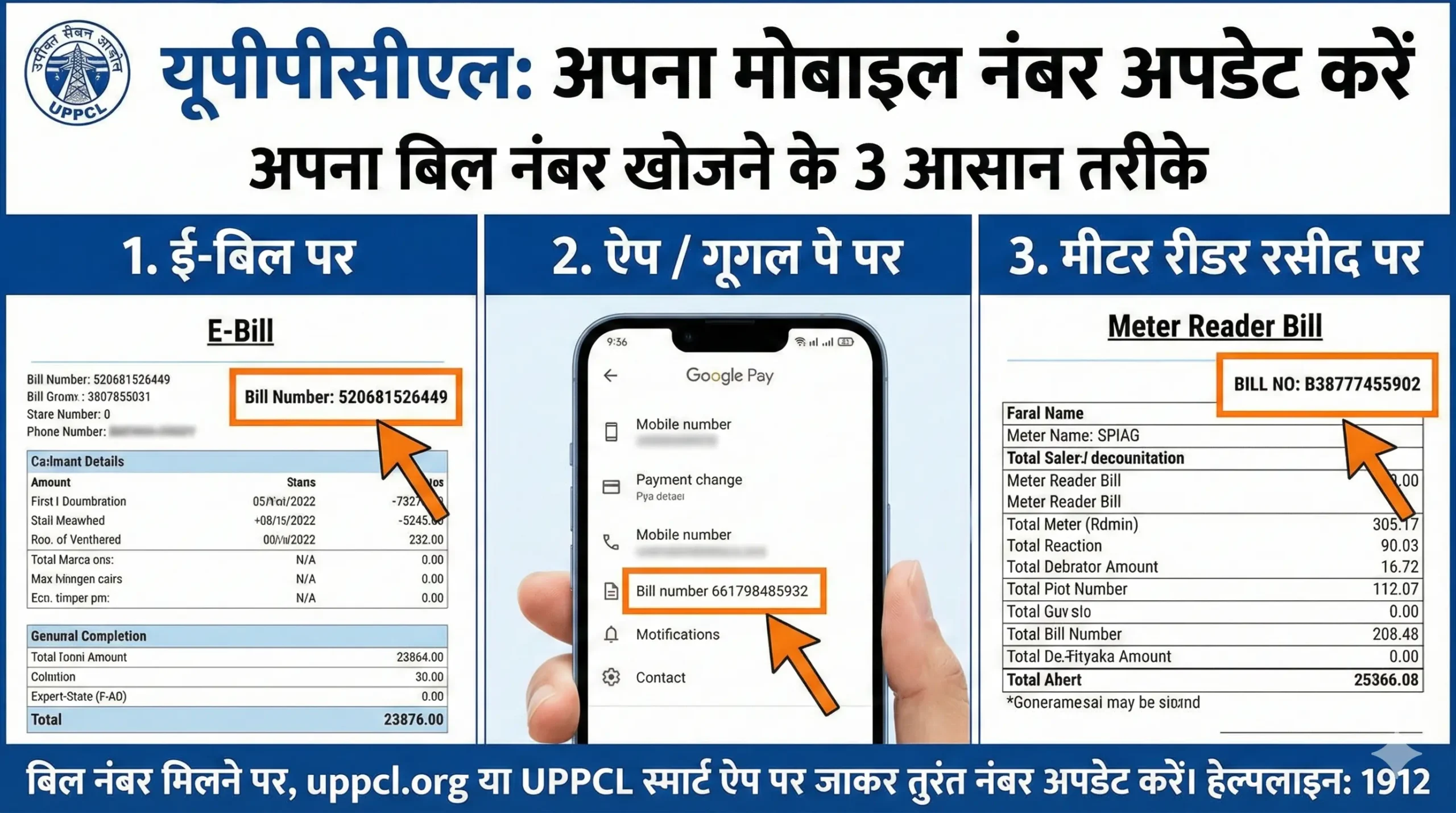
- इसके बाद 'Bill Number' या 'SBM Bill Number' दर्ज करें (यह सुरक्षा के लिए होता है)।
- Continue पर क्लिक करें।
- अब आपको पुराना नंबर दिखेगा। वहां 'Update New Mobile Number' पर क्लिक करें।
- नया नंबर डालें और उस पर आए OTP को वेरीफाई करें।
- Submit करें। आपका नंबर 24 से 48 घंटे में अपडेट हो जाएगा।
3. UPPCL Consumer App से नंबर बदलना
अगर आपके पास लैपटॉप नहीं है, तो आप मोबाइल ऐप का इस्तेमाल कर सकते हैं।
- Google Play Store से "UPPCL Consumer App" डाउनलोड करें।
- अगर आप लॉगिन नहीं कर पा रहे, तो 'Quick Pay' या 'Change Contact Details' (लॉगिन स्क्रीन के नीचे) पर टैप करें।
- अपना अकाउंट नंबर डालें।
- वहां आपको मोबाइल नंबर बदलने का विकल्प मिल जाएगा।
4. ऑफलाइन तरीका (बिजली घर जाकर)
अगर ऑनलाइन तरीके काम नहीं कर रहे हैं, तो आप ऑफलाइन भी आवेदन कर सकते हैं। यह तरीका उन लोगों के लिए बेस्ट है जिनका पुराना नंबर खो गया है।
- स्टेप 1: अपने नजदीकी बिजली उप-केंद्र (Sub-station) या जन सेवा केंद्र (CSC) पर जाएं।
- स्टेप 2: वहां से 'KYC अपडेट फॉर्म' लें या एक सादे कागज पर एप्लीकेशन लिखें।
- स्टेप 3: एप्लीकेशन में अपना अकाउंट नंबर, नाम और नया मोबाइल नंबर लिखें।
- स्टेप 4: इसके साथ अपने आधार कार्ड की फोटोकॉपी और बिजली बिल की कॉपी लगाएं।
- स्टेप 5: इसे जमा कर दें। बाबू (Clerk) तुरंत कंप्यूटर पर आपका नंबर अपडेट कर देगा।
5. अक्सर पूछे जाने वाले प्रश्न (FAQs)
Q1. नंबर अपडेट होने में कितना समय लगता है?
ऑनलाइन अपडेट करने पर यह तुरंत या अधिकतम 24 घंटे में हो जाता है। ऑफलाइन में 2-3 दिन लग सकते हैं।
Q2. क्या नंबर अपडेट करने का कोई चार्ज है?
नहीं, UPPCL मोबाइल नंबर अपडेट करने के लिए कोई शुल्क नहीं लेता। यह सेवा पूरी तरह मुफ्त (Free) है।
Q3. अगर OTP नहीं आ रहा तो क्या करें?
कभी-कभी सर्वर डाउन होता है। आप 1912 (Toll-Free) पर कॉल करके अपनी शिकायत दर्ज करा सकते हैं।
UPPCL Mobile Number Update 2025: How to Change Mobile Number in Electricity Bill?
Are you not receiving electricity bill SMS alerts? Or are you unable to login to the UPPCL website because the OTP is going to an old number? If yes, don't worry. In 2025, UPPCL has simplified the Mobile Number Update (KYC) process significantly.
Whether you live in an Urban or Rural area, you can now change your registered mobile number from the comfort of your home. In this post, we will guide you through both Online and Offline methods step-by-step.
Table of Contents
1. Benefits of Updating Mobile Number
As per UPPCL's new KYC norms, linking a valid mobile number to your consumer account is mandatory. Here are the key benefits:
- Bill Alerts: Get an SMS instantly when your bill is generated.
- OTP Login: Essential for logging into the website or app to pay bills.
- Track Status: Receive real-time updates on complaints filed via 1912.
- Disconnect Warning: Get prior alerts before connection disconnection due to non-payment.
2. How to Update Mobile Number Online? (Official Website)
This is the fastest method. You need to visit the official UPPCL website. The process is the same for all DISCOMs (MVVNL, PVVNL, DVVNL, and PuVVNL).
Requirements:
- Your 10-digit Electricity Account Number.
- Latest Bill Number (or SBM Bill Number) for verification.
- New Mobile Number.
Step-by-Step Process:
- Visit the official website www.uppcl.org.
- Look for the 'Consumer Services' or 'Update Contact Details' option on the homepage.
- Select your Discom and enter your Account Number.
- Enter the 'Bill Number' to verify your identity.
- Click on Continue.
- You will see your old details. Click on 'Update New Mobile Number'.
- Enter the new number and verify the OTP received on it.
- Click Submit. Your number will be updated within 24-48 hours.
3. Using UPPCL Consumer App
If you prefer using a smartphone, the official app is very handy.
- Download the "UPPCL Consumer App" from Google Play Store.
- If unable to login, tap on 'Change Contact Details' or 'Quick Pay' option on the login screen.
- Enter your Account Number and District.
- Follow the prompts to replace your old number with the new one.
4. Offline Method (Visit Sub-station)
If the online methods are not working for you, you can visit the office. This is best if you have lost your old number and cannot receive OTPs.
- Step 1: Visit your nearest Electricity Sub-station or Customer Service Center (CSC).
- Step 2: Ask for a 'KYC Update Form' or write a simple application.
- Step 3: Mention your Account Number, Name, and New Mobile Number.
- Step 4: Attach a photocopy of your Aadhaar Card and latest Electricity Bill.
- Step 5: Submit it to the executive. They will update it instantly on the system.
5. Frequently Asked Questions (FAQs)
Q1. How long does it take to update?
Online updates are usually instant or take up to 24 hours. Offline requests may take 2-3 working days.
Q2. Is there any fee for this service?
No, updating your mobile number in UPPCL records is completely Free of Cost.
Q3. What if I don't receive the OTP?
Server issues can happen. Wait for some time or call the 1912 Toll-Free helpline for assistance.